
If the company that builds the product configured it wrong a hundred times, the odds are not in favor of the portal your team shipped last quarter.
By Damian Gambacorta (g4mb4) and Juan Oliva (th0roid), OliveX Security.
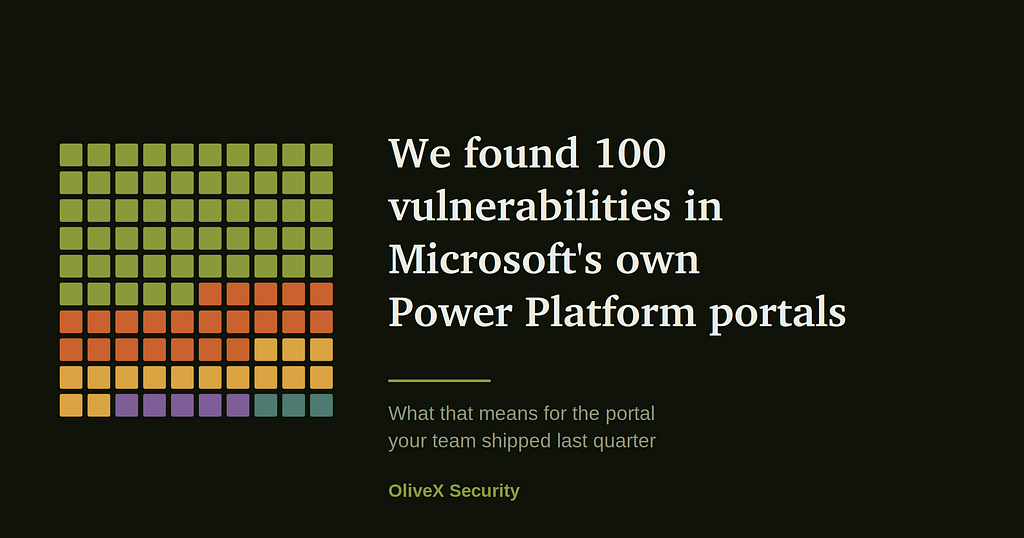
Over one research cycle, the two of us reported 100 vulnerabilities to the Microsoft Security Response Center. All of them on low-code portals built with Power Apps and Power Pages. The campaign returned close to $100,000 in bounties and put both of our handles in the MSRC Top 100 researcher leaderboard.
We are not writing this to talk about Microsoft. Every finding went through coordinated disclosure and every one was fixed. This post contains no asset, no request and no reproducible detail.
We are writing it because of what those hundred findings have in common, and because that common thread is almost certainly sitting in your environment right now.
The question most Power Platform owners cannot answer
Pick any portal your company has published. A customer portal, a partner portal, a supplier form, a claims tracker, an internal request site. Now answer this without looking.
Who is allowed to read the records behind it, and where exactly is that rule enforced?
In the hundred reports we filed, that single question was the entire story. Not a memory corruption bug. Not a zero day in the platform. A rule about who can read what, written into a settings pane by someone under a deadline, and never reviewed again.
If you cannot answer it for your own portals in under a minute, you are in the same position as every site we looked at.
First, check whether this applies to you
The product names get used loosely, so here is the map. Power Platform is the umbrella. Inside it sit Power Apps, Power Pages, Power Automate, Power BI and Copilot Studio. Power Pages grew directly out of Power Apps portals, the external-facing website capability of Power Apps, and Microsoft spun it out under its own name in 2022. Both are the same low-code family, backed by the same data engine, Dataverse.
A custom domain changes nothing. Underneath a polished corporate URL, the stack is the same low-code portal projecting Dataverse tables onto the public internet.
So if any of the following is true, this post is about you. You have a public site built on Power Pages. You have a Power Apps portal, including old ones nobody has looked at since launch. You have a Dynamics 365 deployment with a self-service or partner-facing site attached. You have a Power Platform environment where business teams build their own apps.
Why your portal is in worse shape than Microsoft’s was
This is the reason we published.
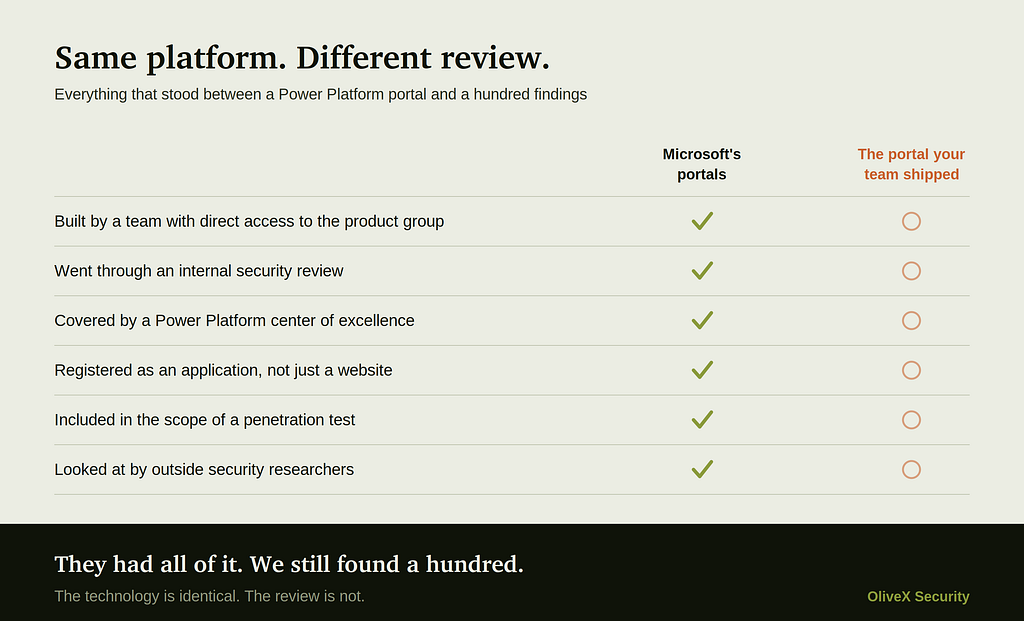
The portals we tested belonged to the company that builds the platform. Those teams have direct access to the product group, internal security review, a center of excellence and the best documentation in existence. They still shipped a hundred of these.
Your portal was most likely built in a few weeks by a business analyst or a delivery partner, to hit a date, by someone whose job title does not contain the word security. Nobody threat modeled it, because it was a form. And your annual penetration test almost certainly did not cover it, because nobody filed it as an application. It was a site that marketing or operations stood up, so it never made it onto the scope document.
That is the whole gap. The technology is identical. The review is not.
The root cause is configuration, not code
The platform itself is mature. What exposes a site is how it was configured. A low-code portal reaches Dataverse through a high-privilege application identity. The only thing standing between an anonymous visitor and a table of records is the layer of table permissions, web roles and column-level security that the site owner is expected to lock down by hand.
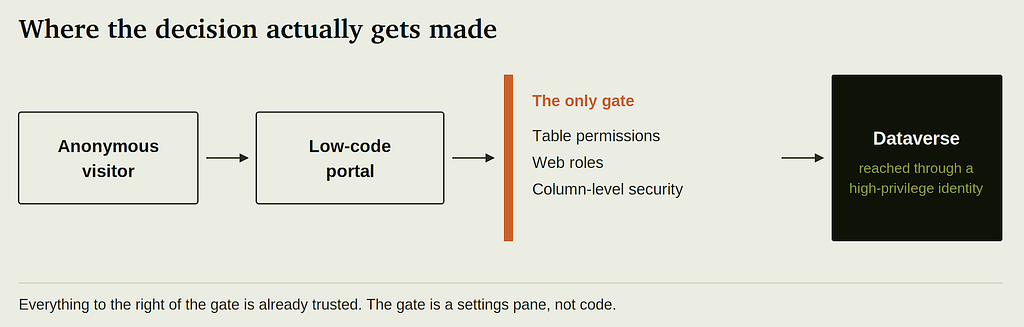
When those controls are drawn too broadly, the platform does exactly what it was told to do, whether that means a permission scope left global instead of bound to the record owner, a table opted into the portal Web API without restricting which columns come back, or a form that trusts the browser to declare who the user is. The data flows, nothing errors out, and the site looks and behaves perfectly while serving records it was never meant to expose.
There is no crash. No stack trace. No failing test, no alert, no anomaly in the logs. A misconfigured portal is indistinguishable from a correct one right up until somebody asks it the right question.
That last point is the one that costs companies money. There is no incident to detect, because nothing breaks. The requests are well formed, authenticated where they need to be, and answered normally. Your monitoring sees a healthy site. Somebody else sees a list of your customers.
What this looks like in business terms
Security findings get written in language nobody outside the team acts on. Here is the same set of issues described as outcomes.
One customer reads another customer’s file. A permission scoped to the table instead of to the record owner means the identifier in the request is the only thing separating two accounts. Change it and you are looking at somebody else’s case, invoice or claim.
Your directory of people walks out the front door. A table published to the portal Web API without column restrictions lets an anonymous visitor page through names, emails, phone numbers and roles at whatever speed they like.
A partner approves their own request. Self-service workflows gated in the interface and never re-checked on the server. The button is hidden, but the request behind it still works.
A site you forgot about is still serving live data. Development, UAT and abandoned portals stay published, usually with production data and always without an owner.
Every one of those is personal data leaving your control. That is a regulated event in every market we work in, from Argentina and Uruguay through Brazil and into the United States and the EU. The reporting obligation does not care that the cause was a checkbox.
Run this check on your own portals
You do not need us for the first pass. Five things, most of them visible from the admin center, and you can get through them in an afternoon.
- Inventory every portal you actually have. Open the Power Platform admin center and go environment by environment. Most teams are surprised by the count. The ones nobody remembers are the ones that matter.
- Look for global scope in table permissions. Anything granting read or write across a whole table, rather than to the record owner or the owning account, needs a written justification. Most of what we found lived exactly here.
- List the tables opted into the portal Web API, and the columns they return. Treat every one of them as public. If a column is not needed to render the page, it should not be exposed.
- Log out and browse your own site. Whatever loads without authentication is public, permanently, to everyone. Including search engines.
- Take a record you own and change its identifier. In the address bar, or in the request the page makes. If you get somebody else’s record back, you have found the same class of issue that made up more than half of our hundred.
If step five returns something it should not, stop and get help before you start changing permissions in production. Tightening scopes on a live portal breaks things in ways that are not obvious.
What we do about it
At OliveX Security we review this exact stack. Power Pages, Power Apps portals and the wider Power Platform. Not a generic web application test pointed at a portal, which is what most vendors deliver and which misses almost everything described above, but a review built around table permissions, web roles, column-level security, Web API exposure and the identity flows these portals depend on.
Our entry engagement is a fixed-scope Power Platform Exposure Review. We inventory your portals, test them the way we tested these hundred, and hand back findings with the specific configuration changes that close them, rather than a report that tells you to consult the documentation. Findings arrive as we confirm them, not at the end.
Start here. Tell us how many portals you run and we will come back with scope and turnaround. olivex.io
The classes we saw, and the one that surprised us
For the practitioners reading. Described at a high level, since the goal is recognition rather than reproduction.
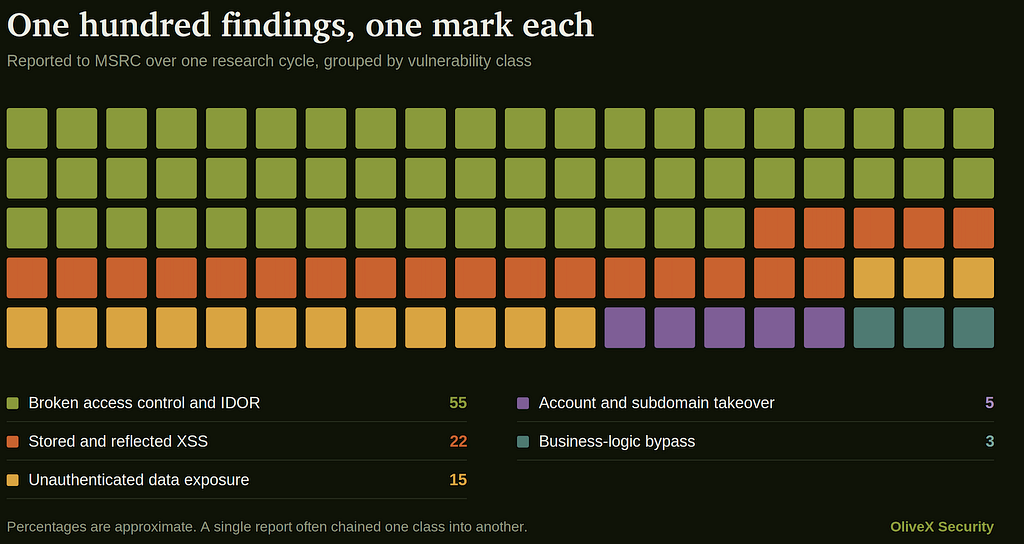
Broken access control and IDOR, around 55 percent. The dominant class by a wide margin. Honestly, the boring half of the campaign. No cleverness, no chain, no exotic primitive. Just a permission that was never narrowed after the portal went live.
Stored and reflected XSS, around 22 percent. This one genuinely surprised us. Low-code is supposed to be the place where you do not get to make this mistake, because you are not writing the rendering layer. The framework escapes output for you. That is half the pitch. And yet more than one in five of our findings was a script execution, because the moment a portal is customized, with a rich-text field, a custom template, a control that renders raw markup, the guarantee quietly stops applying and nobody is told. On a portal shared by external users and internal staff, that is a foothold in other people’s sessions.
Unauthenticated data exposure, around 15 percent. Tables published to the portal Web API without restricting the returned columns. The fastest to find and the most uncomfortable to write up.
Account and subdomain takeover, around 5 percent. Small in count, large in consequence. Dangling DNS to portals that no longer exist, and identity flows that never fully verify who is acting.
Business-logic bypass, around 3 percent. Self-service actions gated in the interface and never re-checked on the server. The browser is not a security boundary. It never was, and a drag-and-drop builder does not change that.
Four things people tell us before they find something
“We already run a penetration test every year.” Ask whether the portals were in scope. In our experience they usually are not, because they were commissioned by a business unit and never registered as applications. And a standard web application test rarely goes after Dataverse permission scoping, because the tester has no visibility into the configuration that decides it.
“Microsoft secures the platform.” Microsoft secures the platform. You configure the access. That line is exactly where all hundred of our findings lived, and the portals we tested were Microsoft’s own.
“It is only a contact form.” A form writes to a table. The question is what else that table exposes and who else can read it. The interface is not the attack surface. The data layer behind it is.
“Only our partners can log in.” That is the condition under which the highest-impact findings show up, because partner portals hold commercially sensitive records for many organizations in the same tables, and the boundary between them is one permission scope.
Why we reported all hundred, including the ones that paid nothing
On low-code assets Microsoft reserves bounty awards for the highest severity findings. We knew that before we started. We filed every Medium and every High anyway, dozens of them, with no expectation of an award for any one of them.
We did it because the bounty is not the point of a disclosure program. A Medium on a portal holding partner records is still partner records, and every one of those fixes landed on a site that real Microsoft customers use every day. Filtering our own findings by what was going to pay would have left those issues live, and that is not a trade either of us was willing to make.
What made it easy to keep going was how the other side behaved. Every report got the same treatment whether it qualified for an award or not. Triaged fast, communicated clearly, questions answered by people who actually understood the platform, and then remediated. Nothing was quietly downgraded to avoid dealing with it, nothing went silent because it was not going to pay, and the severity model was applied the same way on report ninety-eight as on report two. Anyone who has worked a large program knows how rare that consistency is, and how quickly a researcher stops caring once it is missing.
MSRC also does the part most programs forget, which is recognition. Both of us finished in the MSRC Top 100 and were invited to the MSRC Celebration in Las Vegas, and meeting that team in person made the whole thing make sense. These are people who take the security of their customers personally, and it shows in how they run the program.
That is what a mature disclosure program looks like, and it is the reason a two-person collaboration was willing to commit to a hundred reports instead of a handful.
If it happened there, what is running on yours?
The point of this post is not that Microsoft had vulnerabilities. Everyone has vulnerabilities. The point is that the same product, configured by an ordinary IT department under an ordinary deadline, with no product team on speed dial and nobody looking at it from the outside, is not going to do better on its own.
The failure is structural. It is waiting in almost every low-code portal on the internet, and it stays invisible until somebody asks the right question.
We would rather be the ones who ask.
Contact us at olivex.io
All findings referenced here were reported to Microsoft under coordinated disclosure and remediated. No asset, target or reproducible detail is published. OliveX Security, offensive security for LATAM and the US.